
Activate your Global Entry card by signing into the Trusted Traveler Programs portal at ttp.cbp.dhs.gov, navigating to Program Membership(s) on your dashboard, and clicking Activate Membership Card. You'll need two pieces of information ready:
- Your PASSID (also called your membership number or Known Traveler Number)
- The numeric security code printed on the back of your card
That's the whole process. Before you start, though, check whether you actually need to activate. CBP confirms that airport kiosks do not require the physical card. If you only fly internationally and never cross a land or sea border, activation is optional.
Table of Contents
- How to activate Global Entry in the TTP portal
- When do you actually need to activate the card?
- How to check your activation status and fix common problems
- What changes after you activate, and where does your PASSID fit in?
- Activation timing and how long it takes
- Key Takeaways
- The mistake most approved travelers make
- Passportcenter has the travel-document answers you need before you fly
- Official sources and further reading
How to activate Global Entry in the TTP portal
Follow these steps exactly. The portal labels and button names matter, so read carefully before clicking.
- Go to ttp.cbp.dhs.gov. Click Sign In. You'll be redirected to Login.gov for authentication. Log in there, then you'll return automatically to the TTP dashboard.
- Locate Program Membership(s). Once on the dashboard, find the section labeled Program Membership(s). Your Global Entry membership will be listed there.
- Click "Activate Membership Card." This button appears only after CBP has issued your card. If you don't see it yet, your card may still be in transit.
- Enter your PASSID. This is the membership number on the back of your card and also visible in your TTP dashboard profile.
- Enter the numeric security code. According to CBP's info guide, enter only the numeric portion if the printed code on the back of your card includes letters or other characters.
- Submit and confirm. The portal will confirm activation immediately if your entries are correct. Note the confirmation message on screen.
Pro Tip: Take a screenshot of the confirmation screen and save it with your travel documents. If a TTP portal glitch clears the confirmation later, you'll have proof of the activation date.
When do you actually need to activate the card?
A lot of travelers activate their card out of habit, not necessity. Here's the honest breakdown:
- Air travel only: You do not need the physical card. Airport Global Entry kiosks verify your identity through fingerprints and TTP records. Once your membership is approved and fingerprints are enrolled, kiosks work regardless of card status.
- Land border entry (U.S. from Canada or Mexico): You need an activated card to use SENTRI or NEXUS dedicated lanes. CBP guidance is explicit: Global Entry members only need the card for land or sea entry.
- NEXUS or SENTRI members: Always activate your card. These programs require it for dedicated lane access at every crossing.
- Sea ports: The physical card is required for Trusted Traveler lane use at sea ports of entry.
Understanding how Global Entry works at different entry points helps you decide whether activation is urgent before your next trip.
How to check your activation status and fix common problems

Checking status

Log into your TTP dashboard and go to Program Membership(s). An activated card will show a status of Active next to your membership. If it still shows Issued or Pending Activation, the card has not been activated yet.
Troubleshooting step by step
- Login.gov problems. If you can't get past the Login.gov screen, try a password reset directly on Login.gov before assuming the TTP portal is broken. The TTP portal uses Login.gov for all authentication, so TTP itself can't fix a Login.gov credential issue.
- Wrong PASSID. Double-check the number on the back of your card against what's shown in your TTP profile. They must match exactly.
- Alphanumeric code error. This is the most common input mistake. The security code field accepts numbers only. Strip out any letters before entering it.
- Expired activation window. CBP requires you to activate within 30 days of receiving the card. If you miss that window, the card cannot be used for land or sea lane crossings and you must request a replacement card through TTP.
- Profile mismatch (name or passport data). If your name or passport number in TTP doesn't match what CBP has on file, activation will fail. CBP recommends updating your TTP profile or contacting TTP support rather than retrying repeatedly. Repeated failed attempts won't fix a data mismatch.
Pro Tip: If the portal returns an error you can't identify, try a different browser or device before calling support. TTP portal issues are often browser-specific, and Chrome or Firefox on a desktop tends to be more reliable than mobile browsers.
For unresolved issues, contact CBP directly at cbp.gov/contact.
What changes after you activate, and where does your PASSID fit in?
Activation doesn't change how airport kiosks work. Your fingerprints and TTP records handle that. What activation unlocks is physical card use at land and sea ports.
Here's where each identifier is used:
- Physical card (activated): Present it at SENTRI/NEXUS dedicated lanes at land borders and at sea port Trusted Traveler lanes.
- PASSID / Known Traveler Number (KTN): Enter this when booking airline tickets. It's what triggers TSA PreCheck on your boarding pass. Your PASSID appears in your TTP dashboard and on the back of your card.
- Airport kiosks: No card needed. Walk up, scan your fingerprints, and the kiosk does the rest.
Keep a screenshot of your PASSID from the TTP dashboard saved on your phone. You'll use it more often than the card itself, especially for flight bookings. If you're ever unsure where your membership number appears, your TTP profile is the definitive source.
Activation timing and how long it takes
Activation is usually immediate once you enter the correct PASSID and numeric security code. There's no processing delay on CBP's end for a standard activation.
The timing rules to know:
- Activate within 30 days of receiving the card. This is a hard CBP deadline. After 30 days, the card can no longer be activated for land/sea lanes. You'd need a replacement card.
- If land travel is imminent: Activate the day the card arrives. Don't wait. The process takes under five minutes when your credentials are correct.
- Lost card or missed window: You can still use airport kiosks without any card. Request a replacement through your TTP dashboard to restore land/sea lane access.
For context on how Global Entry application timing affects your overall travel prep, the enrollment and card delivery timeline matters if you're planning a land-border trip soon after approval.
Key Takeaways
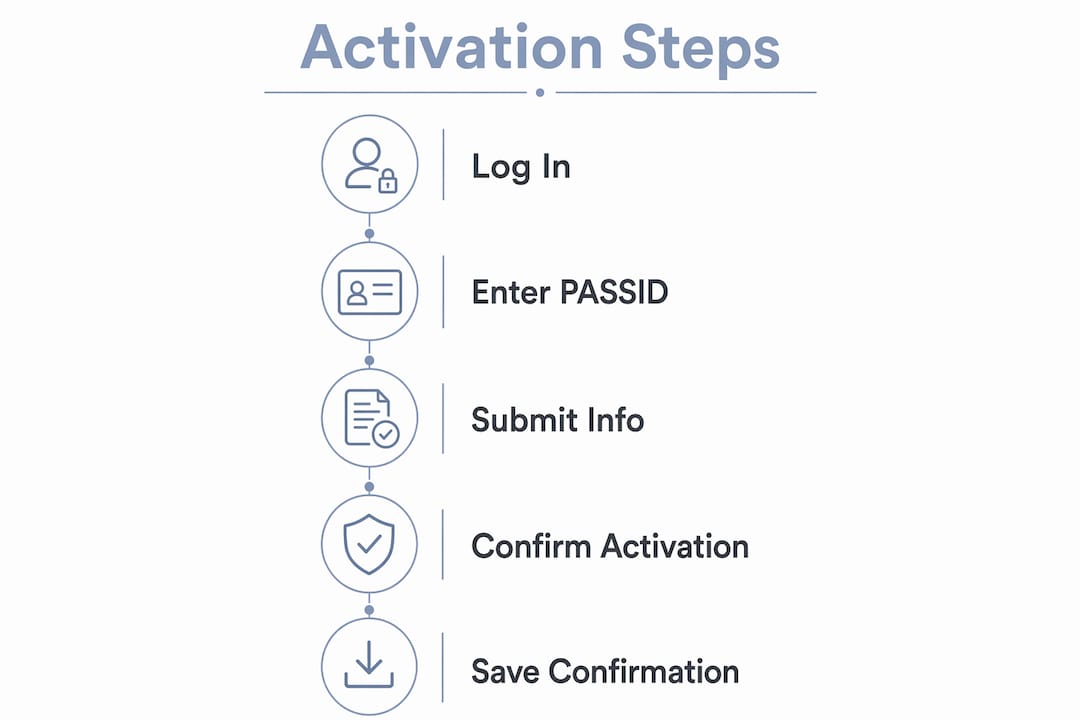
Activating your Global Entry card takes under five minutes in the TTP portal, requires only your PASSID and numeric security code, and is only mandatory if you plan to use land or sea Trusted Traveler lanes.
| Point | Details |
|---|---|
| Activation is not always required | Airport kiosks work without the card; activate only if you use land or sea Trusted Traveler lanes. |
| Two fields required | You need your PASSID and the numeric-only security code from the back of the card. |
| 30-day activation window | Activate within 30 days of receiving the card or the card cannot be used for land or sea lane crossings. |
| Activation is immediate | Once correct values are entered in the TTP portal, the card activates instantly. |
| Passportcenter resources | Passportcenter covers Global Entry timelines, PASSID location, and passport prep at passportcenter.ai. |
The mistake most approved travelers make
Most people who contact CBP about activation problems made the same error: they entered the full alphanumeric code from the back of the card instead of the numeric portion only. That one input mistake accounts for a large share of failed activations, and it's completely avoidable.
The second most common issue is activating too late. Travelers receive the card, set it aside, and miss the 30-day window. If you're only flying, that doesn't cost you anything. But if a land-border trip comes up six months later, you'll need a replacement card before you can use those lanes.
Here's what I'd tell any approved traveler: screenshot your PASSID from the TTP dashboard the day you get approved, before the card even arrives. That number is what you need for airline bookings and TSA PreCheck. The card itself is a secondary tool, useful specifically for land and sea crossings. Treat it that way, and the whole system makes more sense.
If you receive your card close to a land-border trip, activate it the same day. Don't assume the portal will be available the night before travel. And if your name or passport data in TTP looks even slightly off, fix it before you try to activate. A profile mismatch will stop activation cold, and the fix takes longer than the activation itself.
Airport Global Entry benefits continue uninterrupted even if you never activate the physical card, as long as your membership is approved and your fingerprints are on file. That's worth knowing if you're a frequent flyer who rarely crosses a land border.
Passportcenter has the travel-document answers you need before you fly
Sorting out Global Entry activation is one piece of a larger pre-travel checklist. Passportcenter is a free resource built for U.S. travelers who want clear, no-fluff answers on passports, renewal timelines, name changes, and country-specific entry requirements. Whether you need to confirm your passport is valid long enough for your next trip or figure out what documents to carry at a land border, passportcenter.ai has guides, checklists, and direct referrals to registered expedited passport courier services when time is short. Check the site before your next departure.
Official sources and further reading
Use these directly if you need to verify activation steps, check CBP policy, or contact support:
- TTP portal (login and dashboard): ttp.cbp.dhs.gov — sign in here to activate your card or check status
- CBP Global Entry card page: cbp.gov/travel/trusted-traveler-programs/global-entry/card — official activation instructions and card details
- CBP Global Entry FAQ: cbp.gov/travel/trusted-traveler-programs/global-entry/frequently-asked-questions — covers activation windows, card requirements, and PASSID
- Enrollment on Arrival locations: cbp.gov/travel/trusted-traveler-programs/global-entry/enrollment-arrival — for conditionally approved applicants completing interviews at airports
- CBP Global Entry info guide (PDF): cbp.gov/sites/default/files/documents/globalentry-info-guide.pdf — includes the numeric security code instruction
- CBP customer support: help.cbp.gov — contact CBP directly for unresolved activation issues or profile mismatches
This article is general information, not legal or government advice. Confirm current activation requirements and procedures directly with CBP or the TTP portal for your specific situation.