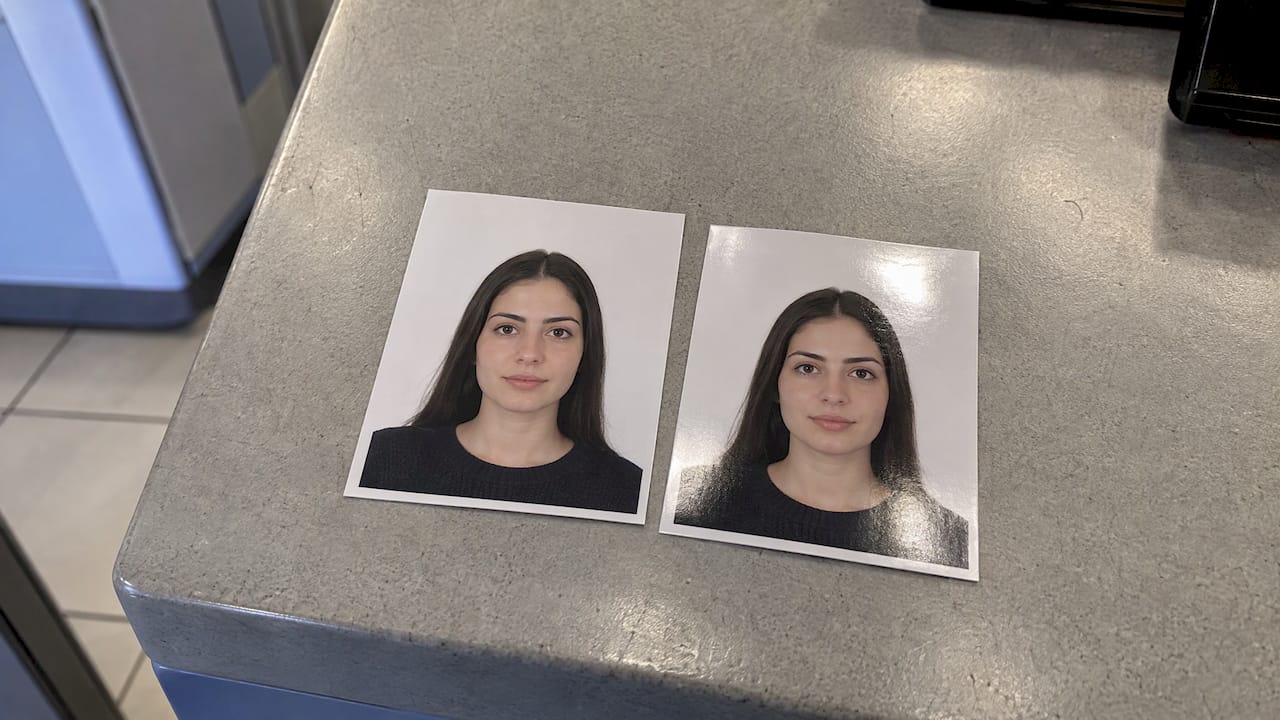
You can use either one. The State Department says to print your photo on matte or glossy photo-quality paper, and it does not rank one finish above the other. What gets photos rejected is poor print quality, not the finish. This guide shows you how to choose between matte and glossy, how to print a photo that passes, and when you should skip printing and upload a digital photo.
TL;DR
- Matte and glossy are both acceptable for a U.S. passport photo. Pick whichever prints cleanly and is easier for you to handle.
- The paper must be real photo-quality paper. Plain office paper is the wrong choice.
- Visible printer dots, grain, blur, smudges, creases and holes cause problems. The finish does not.
- If you renew online, you upload a digital file and print nothing. Never photograph or scan a printed photo to create that file.
- Printed photos must be 2 x 2 inches, in color, and taken within the last six months.
Table of Contents
- The short answer: both finishes are accepted
- What the State Department requires for the print
- Matte vs. glossy: how they differ in practice
- Photo paper vs. plain paper
- How to print a passport photo that passes
- Digital vs. printed photo: which one do you need?
- Photo problems that matter more than the finish
- Perspective
- Need your passport faster?
- FAQ
- Sources
The short answer: both finishes are accepted
The official wording is simple. Photos must be printed on photo-quality paper, and that paper can be either matte or glossy. There is no preferred finish, no bonus for one, and no penalty for the other. If you are comparing the two because you want to know which one is "safer," the honest truth is that neither is.
That changes what you should be asking. Instead of "matte or glossy," ask these three questions:
- Is the paper genuine photo paper?
- Is the print sharp, with no visible dots, grain or pixels?
- Is the photo undamaged when it reaches the reviewer?
If the answer to all three is yes, the finish is a matter of personal handling preference.
What the State Department requires for the print
Here is what the rules say about a printed photo, taken from the application forms and the Foreign Affairs Manual:
- Size: 2 x 2 inches overall.
- Head size: between 1 inch and 1 3/8 inches, measured from the bottom of the chin to the top of the head.
- Color: the photo must be in color.
- Age of the photo: taken within the last six months.
- Paper: matte or glossy photo-quality paper.
- Background: plain white or off-white.
The DS-11 application for first-time applicants and the DS-82 renewal form both state the same photo specifications. The department's own manual, 8 FAM 402.1, also says photographs should be printed on photo-quality paper. For a full breakdown of dimensions, see our passport photo size requirements guide.
Notice what is missing. No official page we reviewed names a minimum paper weight. You may see forum posts or product pages quoting a weight figure as if it were a government rule. It is not on the State Department's photo page. Treat any such number as a product detail, not a requirement.
Matte vs. glossy: how they differ in practice
Because the rules treat both finishes the same, the real differences are about handling, appearance and how forgiving each finish is during the first review. These are practical observations, not official criteria.
| Factor | Matte | Glossy |
|---|---|---|
| Official status | Accepted | Accepted |
| Glare under light | Low | Higher, especially under bright office lights |
| Fingerprints and smudges | Less visible | Show more easily |
| Color and contrast | Softer, slightly flatter | Brighter, more contrast |
| Risk of sticking to other surfaces | Low | Higher if stored in a humid place or pressed against other photos |
| Staple handling | Generally forgiving | Staple marks and small dents can stand out |
| Best for | Mailing, handling, scanning at an acceptance facility | Sharp-looking prints from a photo lab |
The table is a summary of how the finishes behave. It is not a ranking. A clean glossy print beats a grainy matte print every time, and the reverse is also true.
When matte makes sense
Choose matte if you will be handling the photo a lot, mailing it, or stapling it to a form. Because fingerprints are less visible, a matte print tends to look cleaner after it has been handled. It also avoids the bright reflections that can make a photo harder to read under overhead lights.
When glossy makes sense
Choose glossy if that is what your local photo counter or home printer produces best. Many photo kiosks default to a glossy finish, and it gives a crisp, high-contrast print. If glossy is what you have, there is no reason to hunt for matte paper. Just handle the print by the edges and keep it flat.
What about satin or luster?
You will see "satin" and "luster" papers sold alongside matte and glossy. The State Department's wording names only matte and glossy. If you have a choice, pick one of those two so you are not guessing. If a lab hands you a semi-gloss print, check that it is a true photo print and that it is sharp, flat and free of dots.
Photo paper vs. plain paper
The finish is flexible. The paper type is not. The rule is photo-quality paper, which means paper made for printing photographs, not a sheet from your office printer tray.
Plain paper tends to absorb ink unevenly. Fine detail softens, the paper texture shows, and the sheet curls easily. A passport photo is an identity image that is reviewed closely, so a print that looks like a document printout is working against you. The State Department also lists a photo "printed on the wrong paper" among the common reasons photos are rejected.

If you want a deeper look at paper types before you buy, choosing camera paper explains how different papers behave once printed, which helps when you are printing a compliant photo yourself.
A quick paper checklist
- The package says "photo paper," and names either matte or glossy.
- It is designed for your type of printer (inkjet or dye-sublimation, for example).
- The paper is not creased, bent or damaged out of the package.
- You can print at the printer's highest photo quality setting.
How to print a passport photo that passes
If you take the photo yourself, the print is where most problems happen. Follow these steps.
- Take the photo recently. It must be taken within the last six months. Do not reuse an older picture.
- Use an unedited image. The department says not to change your photo with computer software, phone apps, filters or artificial intelligence. The manual adds that digital manipulation and beauty filters are not acceptable. That includes skin smoothing and background swaps.
- Frame it to size. Crop to a 2 x 2 inch square with your head between 1 and 1 3/8 inches tall.
- Print at high resolution. Use the best photo setting. A low-resolution file will look pixelated or grainy on paper.
- Print on matte or glossy photo paper. Either is fine.
- Let it dry. Wet or tacky ink leads to smudges.
- Trim carefully. Cut straight to exactly 2 x 2 inches, with clean edges.
- Inspect it. Look for visible printer dots, banding, streaks, blur or creases. Reprint if you see any.
For help with lighting, background and camera setup, read our guide to taking an accepted passport photo at home.
Attaching the photo
The renewal form instructs you to attach the photo with four staples, placed vertically in the corners and as close to the outer edges as possible. Do not bend the photo. Do not use tape or glue. If you are sending your application by mail, our article on what you can and can't mail with a passport application covers the rest of the package.
Digital vs. printed photo: which one do you need?
This is the question that can save you the cost of printing altogether. It depends on how you apply.
| Situation | Photo format |
|---|---|
| First-time application (DS-11), in person | One printed 2 x 2 inch photo |
| Renewal by mail (DS-82) | One printed 2 x 2 inch photo |
| Online renewal | Digital upload, no print |
The State Department announced online renewal for adults in September 2024, allowing eligible people living in a U.S. state or territory to upload a photo and pay fees online. For that route, the department's digital photo upload page sets these requirements:
- A color photo taken in the last six months.
- A JPG, JPEG, PNG, HEIC or HEIF file.
- A file size between 54 KB and 10 MB.
The same page says not to take a picture of a printed photo and not to scan a physical photo to make the file. That matters for this topic: matte vs. glossy is irrelevant for an online upload, and a photo of a print will often show glare, texture or distortion that a clean digital file would not.
What happens after you upload
The online tool checks whether the photo meets basic requirements. After you submit, an employee reviews it. If there is a problem, the agency sends a letter or email asking for a new photo. A new request costs you time, so it is worth getting the photo right before you send it. Our passport renewal process guide and renewal checklist walk through the full application so you can confirm you are eligible for the online route.

Photo problems that matter more than the finish
If you worry about matte vs. glossy, you are probably already trying to avoid a rejection. These are the issues that actually lead to one. The State Department's photo page says your photo should not have visible printer dots, should not be blurry, grainy or pixelated, and should not be damaged with holes, creases or smudges.
- Edited or filtered images. Beauty filters, app edits and AI changes are not acceptable.
- Old photos. More than six months old is out.
- Wrong size. A photo that is not exactly 2 x 2 inches, or has a head that is too small or too large.
- Shadows or uneven background. The background must be plain white or off-white.
- Glasses, head coverings or uniforms. These are not allowed, subject to the exceptions stated on the form. Our guides to what to wear in a passport photo and the rules for a hijab in a passport photo explain the details.
- Bent or stapled-through faces. Staples go in the corners, not near your face.
Children need extra care because it is hard to get a baby to look at the camera on a plain background. See our infant passport photo requirements.
A note on tougher enforcement
The editing rule is not new, but the Foreign Affairs Manual was revised in January 2026 and the department's public guidance is clear: do not alter your photo. Treat the photo as a plain record of your face. Skip the retouching, even for something small like a stray hair or a blemish.
Perspective
We read the same State Department pages you do, and what stands out is how often people lose time on a detail the government does not care about. Nobody is rejected for choosing glossy over matte. People are rejected for blurry, edited, old or badly cropped photos.
Our approach at PassportCenter.ai is to cut through the noise: tell you what the rules say, point to the official page, and be realistic about your timeline. If you are printing a photo at home, spend your effort on resolution, sizing and a clean background. Then pick whichever finish you can print cleanly.
We built the site for people under pressure: first-time applicants, parents, and anyone with a trip coming up. When the photo is right but the calendar is tight, that is where registered expedited courier services come in, and we connect you to them so you are not guessing.
David
Need your passport faster?
A correct photo prevents delays, but it does not shorten standard processing times. If your trip is close, PassportCenter.ai explains your speed options and connects you to registered expedited passport courier services.
Start at PassportCenter.ai to compare your options and see what fits your travel date.
FAQ
Is matte or glossy better for a passport photo?
Neither is better under the rules. The State Department accepts both, so choose the one that prints sharply and stays clean. Many people prefer matte because it shows fewer fingerprints and less glare.
Can I print my passport photo on regular printer paper?
No. The photo must be printed on photo-quality paper, either matte or glossy. Plain paper can look soft, textured or like a photocopy, and a photo printed on the wrong paper is a listed reason for rejection.
Can I submit a digital passport photo instead of a print?
Yes, for online renewal. You upload a color JPG, JPEG, PNG, HEIC or HEIF file between 54 KB and 10 MB, taken within the last six months. Do not scan or photograph a printed photo to create it. Paper applications still need a printed photo.
Does the paper need to be a certain weight or thickness?
The State Department's photo page does not set a minimum paper weight. Use genuine photo paper that gives a sharp, durable print with no visible dots, and keep it flat and undamaged.
Can I fix or touch up my passport photo before printing?
No. The department does not accept digital manipulation, retouching, beauty filters or AI edits. Retake the photo if lighting, shadows or framing are wrong.
Sources
- Passport Photos, U.S. Department of State
- U.S. Passport Photos, U.S. Department of State (photo rejection reasons and editing rules)
- 8 FAM 402.1 Passport Photographs
- Application for a U.S. Passport, Form DS-11
- U.S. Passport Renewal Application for Eligible Individuals, Form DS-82
- Uploading a Digital Photo, U.S. Department of State
- U.S. passports can now be renewed online, CBS News